Think clearly.
Atlas transforms your notes into a living knowledge system you can speak with.
Begin Exploring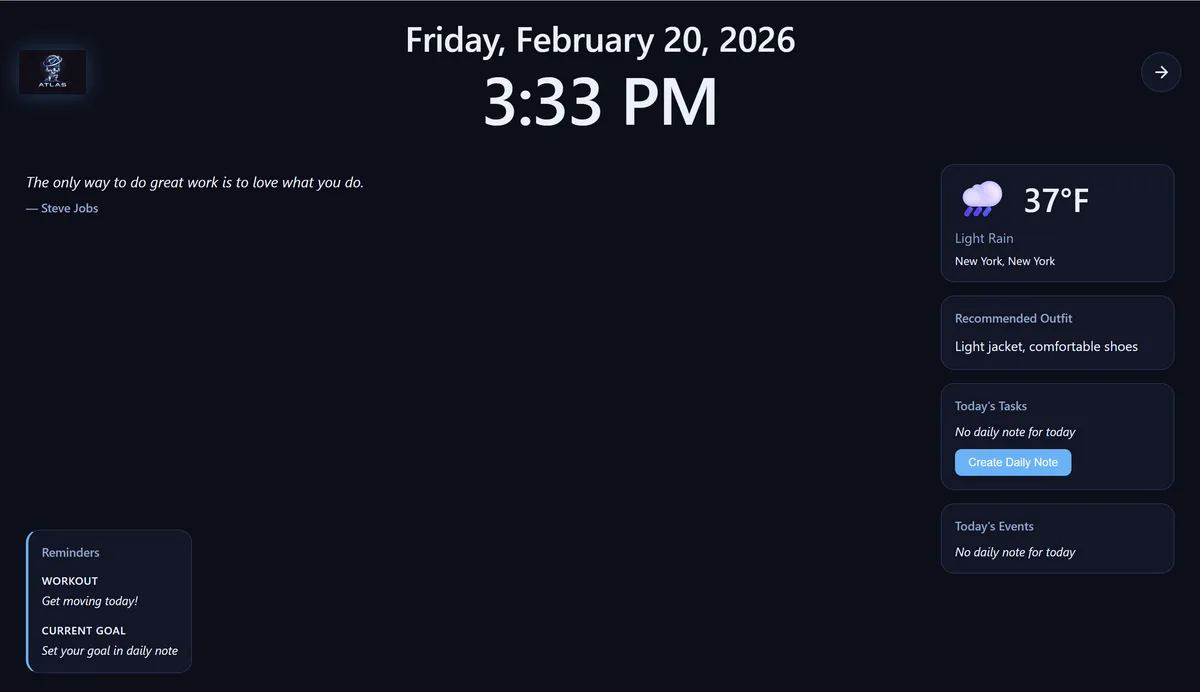


Organize Your Knowledge
Atlas transforms scattered notes into a structured, searchable knowledge base. Your thoughts, research, and ideas are stored in plain Markdown files—no proprietary formats, no lock-in. The built-in file browser, daily notes system, and local search make it effortless to capture information and find it later. Whether you're managing a complex project or just tracking daily tasks, Atlas keeps everything organized without getting in your way.
- Markdown-native files — Your notes are plain text files you can open in any editor
- Local semantic + keyword search — Find notes by meaning or exact phrase, all offline
- File browser with vault structure — Navigate folders and files with a clean, intuitive interface
- Daily notes and task management — Track todos, meetings, and goals in structured daily entries
Talk With Your Notes
Atlas brings AI chat directly into your note-taking workflow, grounded in your own knowledge. Ask questions and get answers based on what you've written, not generic web content. The AI can create notes, schedule reminders, manage tasks, and navigate your files—all through natural conversation. Use your keyboard for text chat or go hands-free with voice input and output. Atlas remembers context across sessions, building a deeper understanding of your work over time.
- AI chat grounded in your notes via RAG — Hybrid vector + keyword search retrieves relevant context automatically
- Voice input (push-to-talk, wake word, conversation mode) — Talk to Atlas naturally with hands-free voice loops
- Voice output (text-to-speech responses) — Hear Atlas read answers aloud while you work
- 39 agent tools for file operations, scheduling, memory — Create notes, set reminders, search files, update CRM—all through conversation
Track Relationships & Time
Atlas includes a personal CRM to track everyone in your network—colleagues, clients, friends, and organizations. Record notes about people, track interactions, and visualize relationships in an interactive graph. Connect your Google Calendar to sync events into daily notes, giving Atlas awareness of your schedule. The dashboard shows upcoming meetings, overdue tasks, and reminders at a glance. Never forget a commitment or lose context on an important relationship.
- Built-in CRM for people and organizations — Track contacts, roles, companies, and interaction history
- Relationship graph visualization — See connections between people, organizations, and topics at a glance
- Google Calendar integration — Sync events into daily notes with OAuth2 authentication
- Daily notes linked to calendar events — See today's meetings and tasks in one unified view
Discover Hidden Connections
Atlas automatically surfaces related notes you didn't know were connected. The knowledge network graph visualizes how your ideas link together, revealing patterns and relationships across your entire vault. Hybrid search combines vector embeddings (semantic similarity) with BM25 keyword matching, using reciprocal rank fusion to deliver the most relevant results. Atlas suggests backlinks to related notes as you write, helping you build a densely connected second brain without manual tagging.
- Knowledge network graph — Interactive visualization of note connections and relationships
- Semantic similarity surfacing — Find conceptually related notes even without shared keywords
- Linked note suggestions — Atlas recommends backlinks to related notes as you write
- Hybrid vector + BM25 search with reciprocal rank fusion — Best-in-class local search combining semantic and keyword signals
Stop searching.
Start asking.
Start organizing.
Start exploring.
Why Atlas?
Markdown-native
Your notes and agent instructions stay in plain Markdown files. Easy to read, easy to change, easy to store.
AI context-aware
Hybrid semantic and keyword search efficiently delivers relevant context to every conversation.
Privacy-first architecture
Local-first by design. Your data stays where you want it.
Personal contact manager built-in
Track people, organizations, and relationships alongside your notes.
Calendar-aware intelligence
Give Atlas your schedule and it will assist you throughout the day.
Frequently Asked Questions
What is Atlas?
Atlas is a local-first AI assistant and personal knowledge management system. It combines a desktop app for managing your notes, files, and CRM data with optional cloud AI services for chat, voice input/output, and web search. Your vault (notes and files) stays on your machine as plain Markdown files, giving you complete data ownership and privacy.
How does local-first AI work?
Atlas runs entirely on your machine for core features like note editing, file management, semantic search, and knowledge graph visualization. AI embeddings are generated using local models with GPU acceleration. When you use cloud AI features (chat, voice), only your questions and relevant context are sent to the cloud—your full vault never leaves your device. You can use Atlas completely offline with the free tier.
What operating systems does Atlas support?
Atlas is available for Windows 10+, macOS 13.4+ (Ventura and later), and Linux distributions including Ubuntu 22.04+ and Fedora 38+. The app is built to provide native performance and a small installer size across all platforms. GPU acceleration for embeddings and wake word detection works on all three platforms (CUDA on Linux, DirectML on Windows, CoreML on macOS).
How is Atlas different from Notion or Obsidian?
Atlas combines the best of both worlds: local-first data ownership like Obsidian with built-in AI chat like Notion. Unlike Notion, your data stays on your device in plain Markdown files. Unlike Obsidian, Atlas includes native voice input/output, a built-in CRM for tracking people and organizations, Google Calendar integration, and AI chat that works out of the box without plugins. Atlas is designed as a complete cognitive operating system, not just a note-taking app.
Is my data private with Atlas?
Yes. Atlas is local-first by design. Your vault, notes, CRM data, memory files, and conversation sessions are stored as plain files on your machine, never uploaded to any server. When you use cloud AI features (chat, voice), only your specific question and relevant context are sent to backend providers. We don't train on your data, and you can use the free offline tier with zero cloud connectivity if you prefer complete privacy.
How much does Atlas cost?
Atlas is free to download and use offline with full access to local features (notes, search, CRM, calendar, knowledge graph). Paid plans start at $15/month for Atlas Talk, which adds AI chat, voice input/output, and web search with about 3,000 messages and 3 hours of voice per month. Atlas Talk Pro ($25/month) doubles those limits. All paid plans include a 14-day free trial — you won't be charged until the trial ends, and you can cancel anytime.
Can I export my data from Atlas?
Your data is already exported—it's stored as plain Markdown files in a folder you choose on your machine. You can open your notes in any text editor, back them up with version control like Git, or sync them across devices using Dropbox, iCloud, or any file sync service. There's no proprietary database or export process. Your vault is just a folder of files you fully control.
Does Atlas work without an internet connection?
Yes. The entire Atlas desktop app works offline. You can create and edit notes, search your vault with local semantic and keyword search, use the CRM to track people and organizations, view the knowledge graph, and manage daily notes and tasks—all without internet. Cloud AI features (chat, voice, web search) require an internet connection and a paid subscription, but the core app is fully functional offline.
How Atlas Compares
| Feature | Atlas | Obsidian | Notion | Evernote |
|---|---|---|---|---|
| Local-first / offline | Partial | |||
| AI chat with your notes | Built-in | Plugin | Built-in | Limited |
| Voice input/output | ||||
| Built-in CRM | ||||
| Knowledge graph | ||||
| Calendar integration | Google Calendar | Plugin | ||
| File format | Markdown | Markdown | Proprietary | Proprietary |
| Free tier | Full offline | Limited | Limited | |
| Open data |
Atlas combines the privacy of local-first software with AI capabilities typically found only in cloud-based tools.
Choose the plan that fits you best
Offline Mode
Local notes, search & organization — no AI. Free forever.
- Local notes & vault
- Local RAG
- Markdown editor
- Local semantic and keyword search
- Network graph and calendar
Atlas Local
No subscription · No usage limits · Completely private
Runs entirely on your own machine. Buy once, own forever.
- Everything in Offline Mode
- AI chat & voice — fully local
- 100% private
- Unlimited messages & voice
Atlas Talk
- Everything in Offline App
- Best performance AI chat
- Best performance Voice chat
- Smart context & file operations
- Periodic automatic updates for best performance
- ~3,000 messages, ~3 hrs voice I/O per month
Atlas Talk Pro
- Everything in Talk
- 2× AI messages
- 2× voice input & output
- ~6,000 messages, ~6 hrs voice I/O per month
Atlas Walk&Talk
- Everything in Talk
- Mobile app
- Cloud-synced data
- Access from anywhere
- Same limits as Talk + mobile access
All paid subscription plans begin with a 14-day free trial.